
1. For WooCommerce 3.0.0 and higher
- Shop and search results:
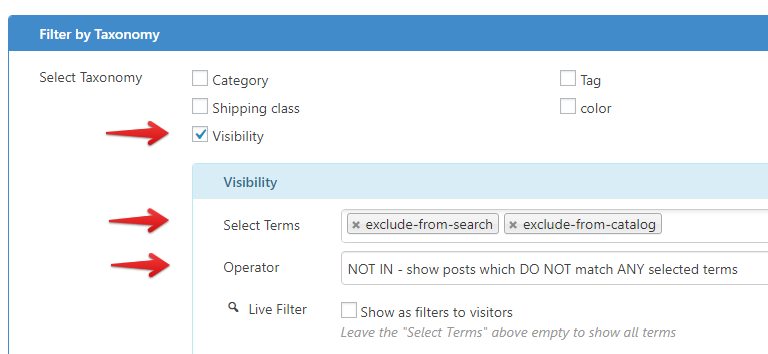
Under Filter Settings > Filter by Taxonomy:
– Select Taxonomy:Visibility
– Select Terms:exclude-from-searchandexclude-from-catalog
– Operator:NOT IN
- Shop only:
Under Filter Settings > Filter by Taxonomy:
– Select Taxonomy:Visibility
– Select Terms:exclude-from-search
– Operator:IN - Search results only:
Under Filter Settings > Filter by Taxonomy:
– Select Taxonomy:Visibility
– Select Terms:exclude-from-catalog
– Operator:IN - Hidden:
Under Filter Settings > Filter by Taxonomy:
– Select Taxonomy:Visibility
– Select Terms:exclude-from-searchandexclude-from-catalog
– Operator:AND
2. For WooCommerce 2.6.14 and before.
To filter products by catalog visibility, please:
- enable Filter Settings > Advance > Custom Fields
- click Add New button to start filtering by a custom field.
Then select:
_visibilityfor Field KeyTextfor Value Type- For Value To Compare, there are 4 possible values:
visible(Catalog/search),catalog,search,hidden - For Operator To Compare, select
LIKEto filter products which have selected visibility, selectNOT LIKEto filter products which don’t have selected visibility
Best regards,


